

In 2026, AI can generate up to two minutes of continuous, high-definition video from a single text prompt. Tools like OpenAI’s Sora 2, Runway’s Gen-4, and Kuaishou’s Kling 3.0 no longer just copy visual patterns. They now simulate gravity, fluid dynamics, and how light and shadow interact in the real world.
The gap between captured footage and algorithmically generated video is closing fast.
In Nigeria and across Africa, this has created a serious problem. During the 2023 and 2024 election cycles, synthetic audio and video clips were used to exploit ethnic and regional tensions and manipulate voter sentiment.
Just before voting began in 2023, a deepfake audio clip of presidential candidate Atiku Abubakar discussing election rigging circulated online, according to The Cable, a Nigerian online newspaper, timed to land when emotional tension was at its peak and critical thinking at its lowest.
The scam landscape has shifted, too. The old “Nigerian Prince” email trick has been replaced by high-fidelity deepfake videos featuring recognisable faces. Business executive Ibukun Awosika, health influencer Aproko Doctor, and WTO Director-General Ngozi Okonjo-Iweala have all had their likenesses used to promote fraudulent investment schemes and fake medical cures.
The Nation, a Nigerian newspaper, reported that in 2025, singer Ayra Starr and actress Kehinde Bankole were targets of coordinated AI-generated harassment using fabricated footage.
The tools to create these fakes are now available to anyone. That means the responsibility of spotting them falls on you. This guide breaks down exactly what to look for.
Visual signs to look for in the video
Despite how advanced modern AI has become, generating video remains computationally expensive, and subtle failures are common. The trick is knowing what to look for.
1. Watch the eyes
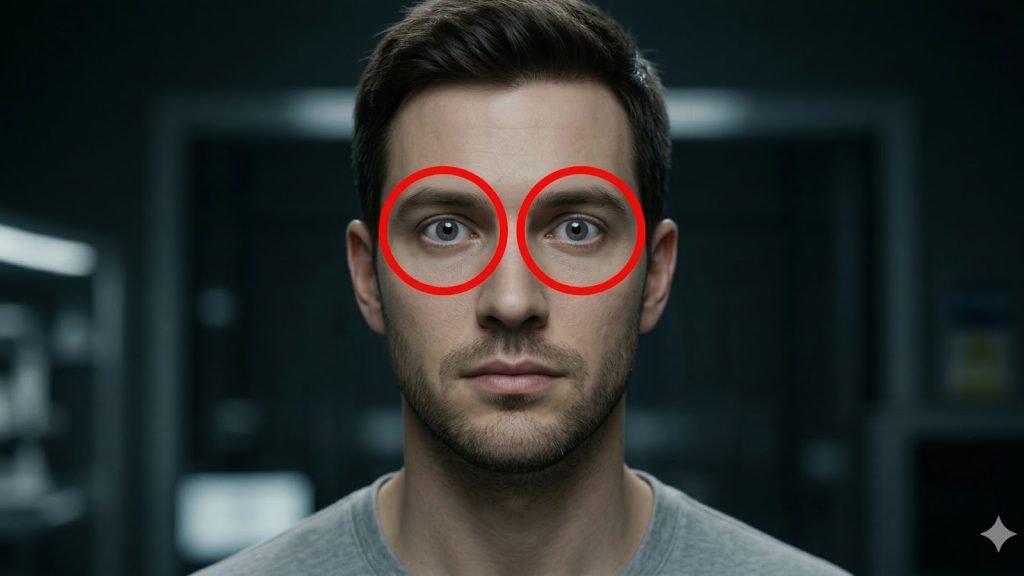
The human eye is one of the hardest things for AI to simulate. In a real person, blinking happens every 2 to 10 seconds and is always accompanied by small muscle movements around the eye and a brief refocus of the iris as it reopens.
AI-generated faces often blink in robotic patterns, either too rhythmically or far too rarely, sometimes only once every 30 to 60 seconds. Beyond blinking, the eyes tend to lack “saccadic” movement, the tiny, rapid shifts the eyes make when scanning a room or following a conversation. The result is a fixed, lifeless gaze that feels disconnected from whatever the person is supposedly saying or reacting to.
A deepfake video of Ngozi Okonjo-Iweala was flagged by analysts, in part because her gaze remained unnaturally steady throughout, without adjusting to the lighting in the supposed interview room.
2. Check the skin
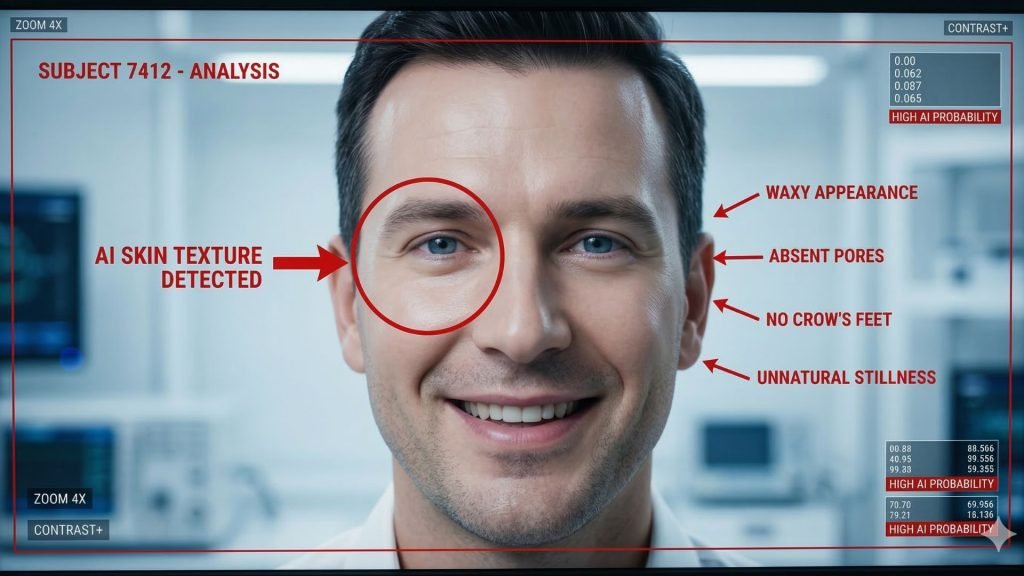
Current AI models like Sora 2 can render 4K video, but they often oversmooth skin. The result is a face that looks waxy, overly polished, or oddly clean. Human skin has pores, fine hairs, variations in pigmentation, and a slight, rhythmic colour change due to blood flowing through capillaries. These details are expensive to render, and AI tends to skip them.
Pay close attention when the person smiles or speaks. On a real face, the skin around the eyes and mouth wrinkles and moves. On an AI face, it often stays suspiciously still. The absence of those small crinkles around the eyes during a genuine smile (known as Duchenne markers) is a strong indicator that the face is synthetic.
In deepfakes of Ibukun Awosika, the skin around her eyes remained static even while she was supposedly delivering an energetic promotional speech. That level of stillness is physiologically impossible.
3. Watch the mouth and lip sync

Speaking involves an intricate coordination of the jaw, tongue, and lips. AI approximates this rather than truly simulating it, and the result is a mouth that looks like it is sliding across the face rather than being attached to a jaw and skull.
Lip sync breaks down most obviously on plosive sounds like “p,” “b,” and “m,” which require the lips to fully press together before releasing. There is often a slight delay between the audio and the visual. Also, look at the interior of the mouth. In many AI videos, teeth appear as a single white block rather than individual structures with natural gaps and imperfections.
A useful test is to mute the audio and watch the mouth movements alone. If the jaw movement looks rhythmic but does not match the muscular effort you would expect from the words being spoken, the video is likely fake.
4. Look at the background

AI generators typically focus their processing power on the main subject and let the background slide. High-quality fakes can look convincing at first glance, but closer inspection often reveals problems.
Look for people in the background with missing fingers or limbs, furniture that appears warped or distorted, and text on signs or screens that is gibberish or keeps shifting between frames. In the “Baphomet Book Club” AI images that circulated in South Africa, the children looked convincing, but the bookshelves behind them contained books that appeared to melt into one another.
Also, watch how water, fire, or smoke behaves in the background. Fluid dynamics are notoriously difficult for AI. Liquids often move in slow-motion or lack the chaotic, random splash patterns of actual physics.
5. Test head rotation and hand occlusion
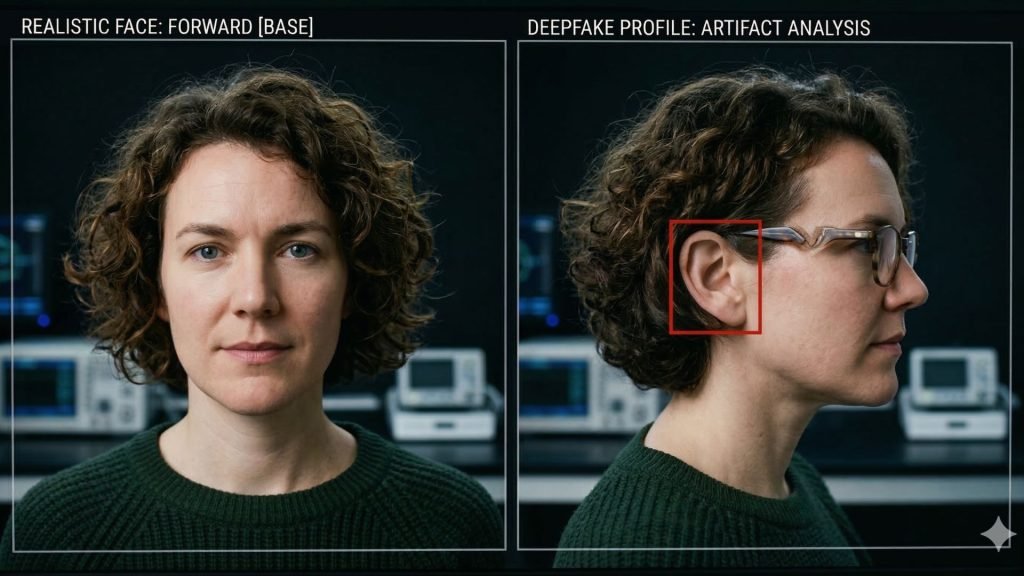
Most deepfake models are trained on front-facing images. When a synthetic face turns toward a full side profile, the rendering often breaks down. Common artefacts include the ear blurring or shifting position, the jawline separating from the neck, or glasses appearing to melt into the skin.
AI also struggles with occlusion, which occurs when one object passes in front of another. If a person waves their hand across their face in a deepfake video, the face will often flicker or momentarily lose its alignment, briefly revealing the underlying source image.
This has become a standard verification step for security-aware organisations: ask the caller to slowly wave their hand across their face and watch what happens to the image beneath.
6. Check shadows and perspective
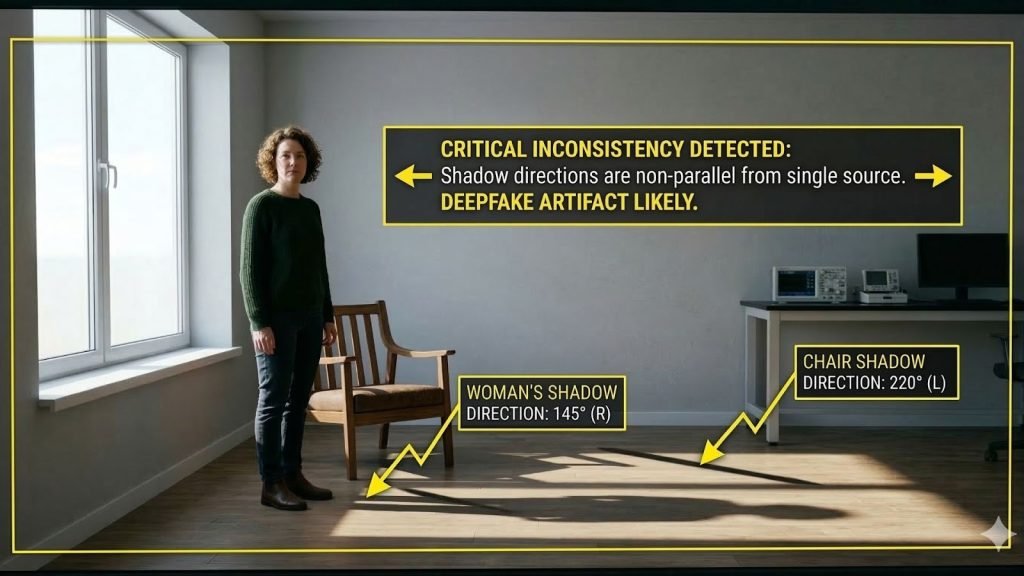
AI understands the world as a set of pixel relationships, not as a three-dimensional space governed by geometry and physics. This leads to specific failures you can test for.
In any real video, all parallel lines in a scene (rooflines, table edges, hallway walls) must converge at a single vanishing point on the horizon. AI models often get this wrong, creating multiple conflicting vanishing points in a single frame.
Shadows are another giveaway. Look for subjects casting shadows in one direction while a nearby object casts its shadow in a different direction. In a deepfake video of South African President Cyril Ramaphosa, the lighting on his face stayed consistent even as he supposedly moved in front of a window, which is not how light works.
Your eyes can only catch so much. These tools go deeper, analysing pixel data, biological signals, and file metadata to calculate the likelihood that a video is synthetic.
| Tool | What it detects | Best for | Key limitation |
| Reality Defender | Multi-model scoring across audio, video, image, and text | Real-time screening of uploads and live calls | Enterprise pricing, not built for individual consumers |
| Intel FakeCatcher | Biological blood-flow signals in the skin (rPPG) | High-assurance verification of human subjects | Requires high-quality, uncompressed video |
| Microsoft Video Authenticator | Pixel-level artifacts, frame-by-frame analysis | Newsroom triage and investigative work | Less effective on heavily compressed clips |
| Deepware Scanner | Temporal inconsistencies between frames, face-swaps | Catching AI faces layered over real actors | Less effective on full AI generation vs swaps |
| InVID WeVerify | Video fragmentation for keyframe reverse searching, known fakes database | Journalists and fact-checkers | Relies on existing debunked content in its database |
| UncovAI | C2PA metadata, GAN signatures, WhatsApp verification bot | General consumers, especially in Africa | Trust Score is probabilistic, not definitive |
| CloudSEK | Threat intelligence and infrastructure mapping | Tracking the origin of coordinated fake campaigns | Platform-based, not a consumer tool |
| Pindrop Pulse | Acoustic and behavioural voice analysis | Call centres and banking fraud prevention | Voice-focused, not video-native |
The pulse test: Why biology beats pixels
One of the most reliable detection methods in 2026 is analysing physiological signals that AI simply does not simulate. As a human heart beats, it causes subtle rhythmic changes in skin colour as blood moves through the capillaries. Systems like Intel’s FakeCatcher use remote photoplethysmography (rPPG) to detect these signals.
Because generative AI creates pixels based on visual patterns rather than biological systems, a synthetic face will lack this pulse. Even Sora 2 at 4K resolution fails this test because it is predicting the next most likely arrangement of coloured pixels, not rendering a living human being.
The limitation is significant, though: this signal disappears in low-resolution or heavily compressed video. It will not work on a WhatsApp clip that has been forwarded multiple times.
The C2PA standard: Proving reality instead of detecting fakes
The industry is shifting from detection toward provenance, which means proving that a video is real rather than identifying whether it is fake. The C2PA standard, adopted by Adobe, Sony, and Leica, embeds a cryptographic signature into a file at the moment of capture. Every edit made to the video after that point is recorded in a tamper-evident trail.
The problem is that platforms like X (formerly Twitter) often strip metadata to save bandwidth. This removes the C2PA manifest entirely, leaving the video unverified even if it was originally authentic. This creates what is known as a “provenance gap,” which scammers actively exploit by sharing videos on platforms that strip metadata.
What to do when you are unsure
Tools help, but the most important thing is your own verification process. Organisations like Africa Check and Dubawa emphasise that spotting a fake is a process of connecting dots, not a single click.
Step 1: Check your emotional reaction first
AI-generated misinformation is built to trigger strong emotions. If a video makes you feel sudden anger toward a political opponent, excitement about an investment opportunity, or fear about something happening to someone you respect, treat that reaction as a warning sign rather than confirmation.
Deepfake content is frequently timed to maximise emotional impact and minimise critical thinking. The fake Atiku audio in the 2023 Nigerian election dropped just hours before polling began for exactly this reason.
Step 2: Investigate the source and trail
Ask where the video actually came from. Check whether the account posting has a verifiable history and a real identity. A genuine video of a significant event (a presidential address, a major accident, a celebrity appearance) will always generate secondary coverage from independent sources.
If a video claims to show something world-altering and no credible outlet is reporting it, that alone is a strong indicator of fabrication.
Step 3: Check the file metadata
Use a tool like ExifTool or the “Get Info” function on your Mac or PC to examine the file’s hidden information. AI-generated videos often contain timestamps or software tags that contradict the story of when and where the video was supposedly shot.
A video claiming to be live footage from Lagos but carrying a creation date from three days earlier is an immediate red flag.
Step 4: Run a keyframe reverse search
Because videos are made up of individual frames, you can treat a single frame as a photograph. Using the InVID WeVerify extension, extract a frame and run it through Google Images or TinEye.
This often reveals that the video is actually older footage from a different country or context that has been altered. A widely circulated shallow fake featuring Bola Tinubu was debunked exactly this way, by finding the original, unedited footage of the same event on YouTube.
Step 5: Verify through a second channel
For anything involving financial instructions or requests from a person in authority, always confirm through a separate, trusted channel. If a video of a CFO orders a wire transfer, call the CFO’s known office number directly or send a message through a verified platform to confirm.
This out-of-band verification is currently the only foolproof defence against real-time deepfake impersonation.